Executive summary: why it’s one-of-a-kind
Inside-only naming
A real DNS namespace that only tunnel clients can resolve. No public directory required.
Hard public blocking
.yura is actively blocked at the edge unless you’re in the tunnel subnet — anti-enumeration by design.
Composable routing
Built-in services (search/portal) plus user-registered private targets in private IP space.
Architecture diagram
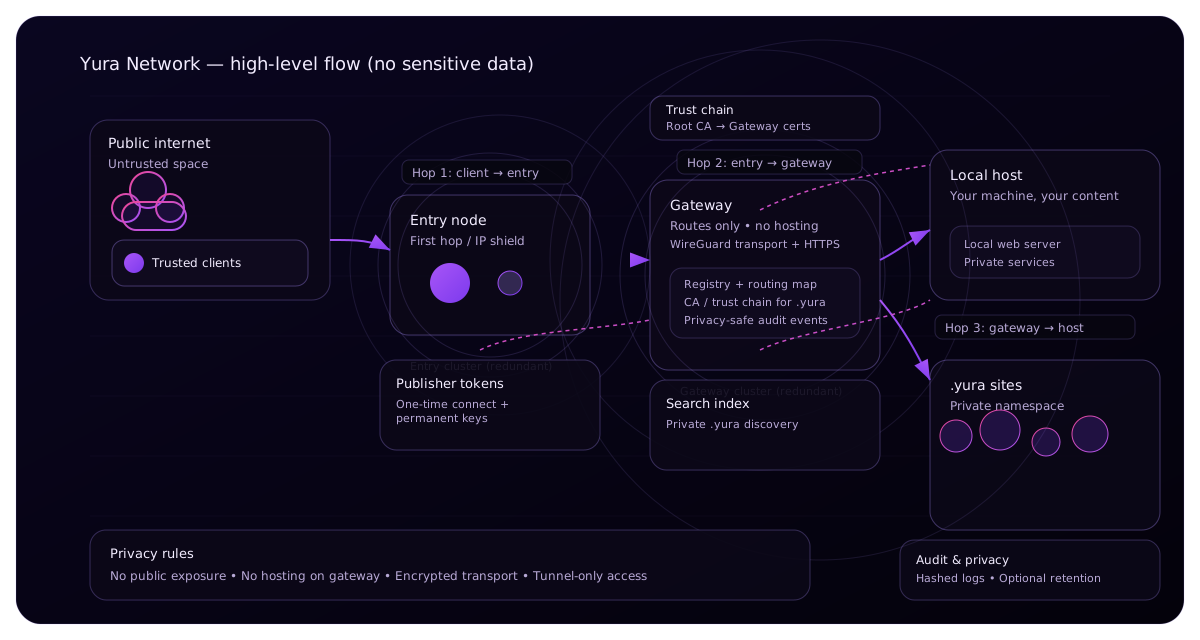
1) Layered model
L3: WireGuard transport
Encrypted client↔gateway transport. Clients live in 10.77.0.0/24; gateway is 10.77.0.1.
L7: Private DNS
*.yura resolves via tunnel DNS (10.77.0.1) to the gateway. No public DNS listing is needed.
L7: Routing registry
Hostnames map to private targets (inside tunnel) or to built-in services (search/portal).
2) Privacy boundary: anti-enumeration edge control
Public internet cannot crawl .yura
At the edge, .yura is blocked unless the request originates from the tunnel subnet. This prevents external scanning, crawling, and enumeration. It’s enforced, not “discouraged”.
Discovery is internal
Discovery happens inside the tunnel via services like yurasearch.yura. The public site intentionally does not list domains or counts.
2.1) Multi-node routing pipeline (how requests actually flow)
The tunnel system is built around roles (nodes), so the boundary and routing logic is clean and auditable. This is the “first node → next node → gateway → target” idea — without exposing private inventory.
.yura because Hop 1 blocks it.3) Onboarding: token-based provisioning
Instead of shipping long-lived secrets inside an installer, YuraNetwork provisions tunnel configs using a short-lived token flow. This reduces blast radius if an installer is copied or inspected.
Identifiers generated by the system
- tokenId: UUID for one-time provisioning
- clientName: derived label for WireGuard client config (non-sensitive)
- publisherId: long-lived publisher identity (
pub_*) - siteKey: per-site management key (for updates/rotation)
Design goal: identifiers support operations, while avoiding public enumeration and avoiding long-lived shared secrets in installers.
Why token TTL matters
- Limits replay and link-sharing abuse
- Forces fresh provisioning after time passes
- Reduces value of leaked screenshots/logs
4) Publishing: local-first private websites
Yura Site Kit
A generated zip starts a local static server, registers a domain, and stores a site key for future runs — keeping content hosted on your machine.
Routing constraints (safety)
- Targets are private (inside 10.77.*)
- Ports validated
- Gateway can probe reachability before mapping
Publishing deep dive (public-safe)
Publishing is designed to keep content local while making the hostname globally usable inside the tunnel.
Why this is safer than “open a port”
- Your origin isn’t publicly reachable
- There’s no public DNS record to enumerate
- Edge enforcement keeps scanners out
How you run multiple sites
- Use multiple folders (each has its own config)
- Each site can bind a different local port
- Each site can have its own hostname + site key
5) Trust model: public PKI + private CA
Public portal
Standard web PKI (Let’s Encrypt) for yuranetwork.com.
Private services
Yura Root CA + CRL for .yura:
6) Routing registry lifecycle (public-safe)
Register
A publisher registers a hostname in the private namespace and maps it to a private target (inside the tunnel subnet). The gateway can validate input (format/port/subnet) and probe reachability.
Update / rotate
Targets can be updated (e.g. IP changes), and credentials can be rotated. This supports real operations without long-lived brittle secrets.
Publisher vs Site model
7) Key lifecycle (publisher + site)
Publisher keys
Publisher identity is allowed to create/manage sites. Publisher keys are long-lived by design so operators can manage multiple sites without re-onboarding every time.
- Used to generate site kits and manage site lifecycle
- Rotation exists for hygiene (compromise containment)
Site keys
Each site has its own management key so control can be scoped. If one site key is compromised, it doesn’t automatically compromise the whole publisher.
- Used to update targets (IP/port) safely
- Rotation exists for per-site containment
8) Security controls (concrete, verifiable)
Hard blocks
Private namespace blocked unless inside tunnel subnet.
Gating
Admin-only / expensive operations gated to prevent abuse.
Key hygiene
Publisher/site key rotation supports real operations and compromise containment.
Threat model table (explicit)
9) Failure modes (real-world)
Client DNS points to old IP
If the client resolves yuranetwork.com to an old server IP, token connect fails. Fix: reliable DNS (1.1.1.1 / 8.8.8.8) + flush cache.
Gateway not bound to tunnel IP
If nginx isn’t listening on 10.77.0.1:443, inside-only services won’t load. Fix is server-side binding.